
Get/Renew a LPC Analysis Cluster Account: remote and badged site access at Fermilab
Obtaining or Renewing a CMS LPC analysis cluster computing account and Fermilab accounts (with possibility of site access)
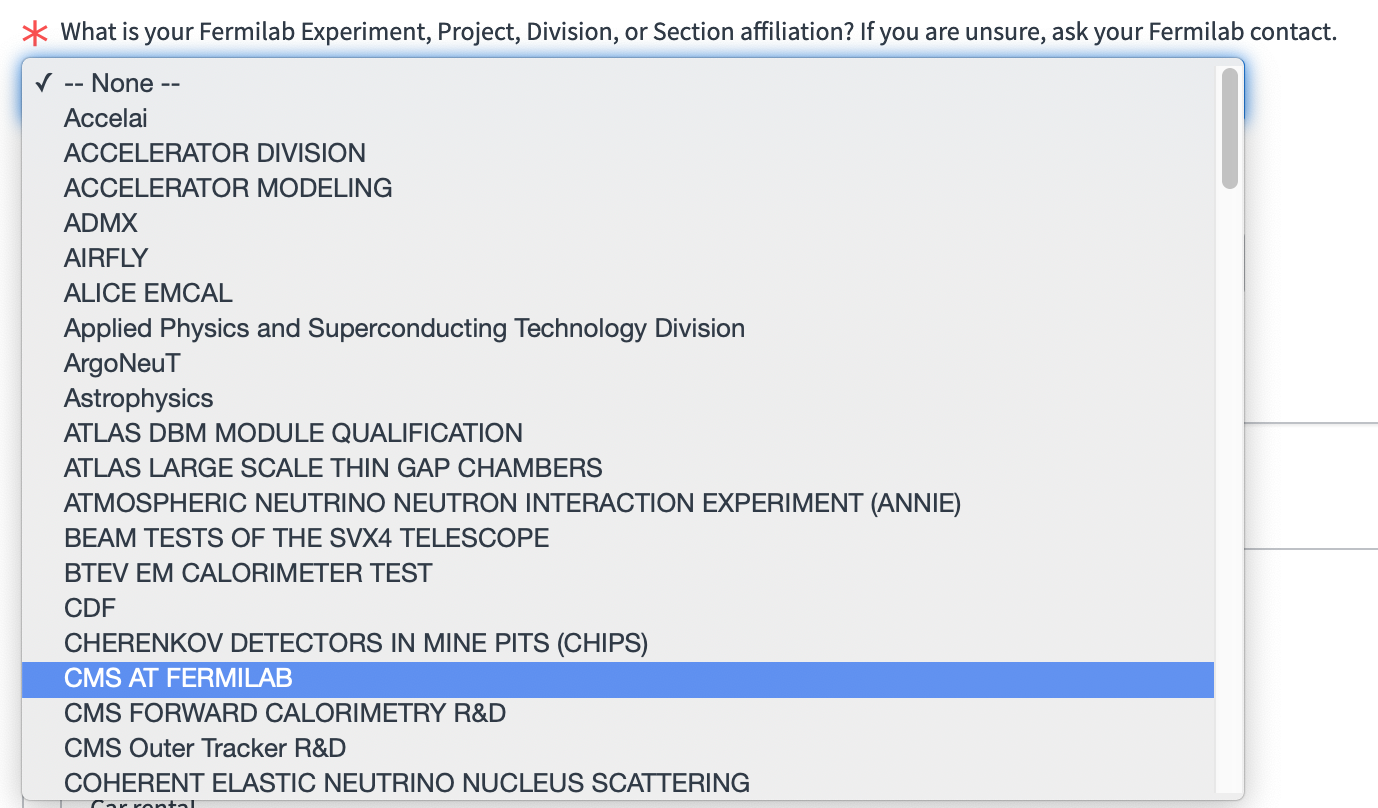
If you are an Affiliate you need to obtain Fermilab and CMS LPC analysis cluster accounts filling out this form for Affiliates and Users for a years access. Be sure to choose CMS AT FERMILAB as your experiment and use ONLY a POC from the drop down menu. as your Fermilab Point of Contact. Support documentation for this whole process including a video can be found at the Campus Access & Experience page.NOTE: Business Visitors and Personal Visitors (who do NOT get computing accounts) should use the badged Fermilab person they are visiting as the Fermilab Point of Contact.
FNAL employees can Add CMS AT FERMILAB affiliation using a form.
Take note of the CMS specific details for Affiliate remote(computing), and onsite Fermilab access accounts below.
Fermilab computing account request details
To understand each of the form options, they are described below.- Select "CMS AT FERMILAB" as your experiment - NOT any others!
- Fermilab Point of Contact name:
Automatic CMS AT FERMILAB METHOD -->
Once you choose CMS AT FERMILAB, from there only a few Fermilab Points of Contact can be chosen, please choose a POC from the drop down menu (this is an example, specific names may be different).

- When will you need access to Fermilab's computing systems?: Choose dates for one year, BE CAREFUL as the system will start providing computing access on the first date you choose for remote, and you will not be allowed onsite for dates outside the onsite dates.
- Onsite access: if your plans might include more than one visit over a year, please put a full year and intermittent. For your primary work location put "WH 11X" if you are visiting the LPC, otherwise put your expected building/floor you are working on. Be sure to have your Remote access a full year to continue your computing access. If you select Fermilab housing, you will need to contact them separately to make arrangements at least two weeks before your stay (housing is VERY limited). Any questions about Visas can be sent to the Fermilab Visa Office.
- Note:For LPC funded visits, do NOT check any of the boxes about Fermilab paying for your visit, as that is not the LPC.
- Home Institution: For your Home Institution - the institution/place from which you are employed should be entered (USCMS PURSUE2025 interns ONLY have different instructions!)
- Institution point of contact name: Your institutional point of contact name should be the CMS person, from your institution, that can vouch for your work on CMS, and may be required to answer questions by email promptly for your account renewal to proceed.(USCMS PURSUE2025 interns ONLY have different instructions!)
- You must give a physics/upgrade/analysis reason for getting computing and site access for the CMS experiment at Fermilab, e.g. Data analysis on BSM physics at CMS
- Any username requests should go into the additional relevant information section
While your Request is processing
- You know your Request is processing as you will get an email with the RITM number, please take note of it, you can get information about it by putting it into the Fermilab Site Access Request Status page. This will have stages and information about who to contact in Fermilab Global Services in each step if it is "stuck".
- You may get emails about providing an Affiliate Research Agreement (ARA) which has to be completed with your institution, be sure to check your Junk/Spam folders if you cannot find those. Your account request will need this completed to proceed.
- In some cases, the Fermilab POC will email your Institutional Contact and/or you with some additional questions, you must modify these as needed for your particular case. Note that your account request will NOT proceed until these are answered:
- Purpose of access: Collaborate with CMS colleagues and participate to LPC events
- Specific activities or involvement specific to the individual: CMS data analysis: specify
- Subjects to be discussed: your analysis, detector work, shift, and or event(s) listed here
- Specific facilities and security areas to be granted access: CMS LPC cluster and Wilson Hall (the latter only if on-site)
- Types of information to be accessible: No sensitive information
- Access granted to systems: CMS LPC computing cluster
- Access mechanisms: Kerberos account; if onsite Badge ID
When Your Account Completes
- There will be required training(s), you can find out more at the click "complete training prior to your badge appointment", these trainings MUST be completed BEFORE your badging appointment
- Be sure to keep the email you receive from Fermilab with the subject "Informal Invitation" as it has the information about your Fermilab Services account validity, site access dates (remote/onsite), and how to obtain passwords
- Take note that you will want to obtain different Fermilab Services, and Kerberos credentials from the Service Desk. The cmslpc (CMS LPC CAF) account will work anywhere from 1 hour to 1 full business day after the ticket is closed, you will get an email with the subject line "Welcome to the CMS LPC CAF (Central Analysis Facility)".
- For onsite: follow all instructions from Fermilab Campus Access which you will be emailed about badging appointments and documents required to have physical copies of for site access
Special Cases not covered above for computing/badge Fermilab access
ONLY if badge needed without renewing remote computing access: have a valid Fermilab Services computing account
If you have a valid cmslpc/FNAL computing account and only need to request a badge, please follow the Onsite Only Access Request form at the Campus Access and Experience site. Refer to the list above for Fermilab POC (do NOT use Dee as of April 2025!). For your primary work location put "WH 11X" if you are visiting the LPC, otherwise put your expected building/floor you are working on. You may get the badge for the whole time until the end of your remote computing access. Note the "Read More" link for instructions in the form. Same day badging is not always possible so please do not make any travel plans without ensuring your access is completed. Contact Campus Access if you have any questions about your request.
Already have Fermilab credentials but not a CMS AT FERMILAB - cmslpc computing account
If you already have active Fermilab credentials (see example sitations below), but have never gotten the "Welcome to the CMS LPC CAF (Central Analysis Facility)" or "Welcome to the USCMS UAF (Central Analysis Facility)" email and cannot login to cmslpc cluster, you need to put in a "Update my Affiliation/Experiment/Collaboration membership Request".
Examples:
- FNAL employee
- Renewed with Fermilab when you had never gotten an E-892/919 (CMS) - or CMS AT FERMILAB account for previous accounts
- Chose a different VO/Experiment when you did your account request (Intern/student) or are moving experiments
- If you think you already have an account, be sure to check the debugging information on the How to Connect to the LPC CAF page
Follow these directions to add CMS AT FERMILAB Affiliation:
- Fill out the a "Update my Affiliation/Experiment/Collaboration membership Request" form.
- Authenticate with FNAL SSO
- Click "Add" to add an Affiliation.
- Click the magnifying glass to search, and choose "CMS AT FERMILAB"
- Your account is complete when you have received the "Welcome to the CMS LPC CAF (Central Analysis Facility)" or "Welcome to the USCMS UAF (Central Analysis Facility)" email. Note that some systems may take up to 1 business day (FNAL time) to synchronize, if there are delays beyond that please contact LPC support
- Purpose of access: Collaborate with CMS colleagues and participate to LPC events
- Specific activities or involvement specific to the individual: CMS data analysis: specify
- Subjects to be discussed: your analysis, detector work, shift, and or event(s) listed here
- Specific facilities and security areas to be granted access: CMS LPC cluster and Wilson Hall (the latter only if on-site)
- Types of information to be accessible: No sensitive information
- Access granted to systems: CMS LPC computing cluster
- Access mechanisms: Kerberos account; if onsite Badge ID
- There will be required training(s), you can find out more at the click "complete training prior to your badge appointment", these trainings MUST be completed BEFORE your badging appointment
- Be sure to keep the email you receive from Fermilab with the subject "Informal Invitation" as it has the information about your Fermilab Services account validity, site access dates (remote/onsite), and how to obtain passwords
- Take note that you will want to obtain different Fermilab Services, and Kerberos credentials from the Service Desk. The cmslpc (CMS LPC CAF) account will work anywhere from 1 hour to 1 full business day after the ticket is closed, you will get an email with the subject line "Welcome to the CMS LPC CAF (Central Analysis Facility)".
- For onsite: follow all instructions from Fermilab Campus Access which you will be emailed about badging appointments and documents required to have physical copies of for site access
Special Cases not covered above for computing/badge Fermilab access
ONLY if badge needed without renewing remote computing access: have a valid Fermilab Services computing account
If you have a valid cmslpc/FNAL computing account and only need to request a badge, please follow the Onsite Only Access Request form at the Campus Access and Experience site. Refer to the list above for Fermilab POC (do NOT use Dee as of April 2025!). For your primary work location put "WH 11X" if you are visiting the LPC, otherwise put your expected building/floor you are working on. You may get the badge for the whole time until the end of your remote computing access. Note the "Read More" link for instructions in the form. Same day badging is not always possible so please do not make any travel plans without ensuring your access is completed. Contact Campus Access if you have any questions about your request.
Already have Fermilab credentials but not a CMS AT FERMILAB - cmslpc computing account
If you already have active Fermilab credentials (see example sitations below), but have never gotten the "Welcome to the CMS LPC CAF (Central Analysis Facility)" or "Welcome to the USCMS UAF (Central Analysis Facility)" email and cannot login to cmslpc cluster, you need to put in a "Update my Affiliation/Experiment/Collaboration membership Request".
Examples:
- FNAL employee
- Renewed with Fermilab when you had never gotten an E-892/919 (CMS) - or CMS AT FERMILAB account for previous accounts
- Chose a different VO/Experiment when you did your account request (Intern/student) or are moving experiments
- If you think you already have an account, be sure to check the debugging information on the How to Connect to the LPC CAF page
Follow these directions to add CMS AT FERMILAB Affiliation:
- Fill out the a "Update my Affiliation/Experiment/Collaboration membership Request" form.
- Authenticate with FNAL SSO
- Click "Add" to add an Affiliation.
- Click the magnifying glass to search, and choose "CMS AT FERMILAB"
- Your account is complete when you have received the "Welcome to the CMS LPC CAF (Central Analysis Facility)" or "Welcome to the USCMS UAF (Central Analysis Facility)" email. Note that some systems may take up to 1 business day (FNAL time) to synchronize, if there are delays beyond that please contact LPC support
- Authenticate with FNAL SSO
- Click "Add" to add an Affiliation.
- Click the magnifying glass to search, and choose "CMS AT FERMILAB"
Note about EOS T3_US_FNALLPC Storage Element (SE) space
Note: Your FNAL EOS area is created but cannot be written to by CRAB (T3_US_FNALLPC), unless the grid certificate is added to Fermilab's database. After account is created: follow directions at the Using EOS at the LPC page to get your grid certificate linked to your T3_US_FNALLPC EOS area.
Check Status of current request and/or get help
- Using your RITM number from your access request, enter into the Fermilab Site Access Request Status page.
- The Campus Access site has documentation on the various steps for remote and onsite access requests, note you should be receiving emails about your request, starting with the first RITM email.
- Contact information for Campus Access is listed on their site, including a US phone number which has fairly rapid response during their business hours.
Get Building Access after you have a working FNAL badge
- If you have a working FNAL badge, you can use CCure access form to add access (most buildings like Wilson Hall, SiDET, and Helen Edwards come with main User/Affiliate/Employee badge access). Note that ITNA training is required to be up to date for those areas. For WH 1ROCE access, please contact LPC support. Any other questions for already badged people to access at fnal.gov.